A late task climbs the org chart every night by itself
What goes wrong
A site survey is due on day two. On day four the team are in three different places and nobody has a single view of what is late. The delivery ops head discovers it by accident when the customer rings angry.
Documentation verification takes a day. The papers went in on day one. Today is day sixteen and nobody has escalated the delay to the ops head. The DISCOM rejection arrives, and you ring the documentation ops to find out why, instead of the system telling you first.
Loan sanction is scheduled for day four from the bank. It has not arrived on day twelve. The salesperson chasing the bank never tells the general manager. On day twenty-five, when the project should be on site survey, it is still waiting.
You hold a Monday status meeting to chase down all the tasks that slipped during the week. Thirty minutes of people reporting on work they forgot was due. By Wednesday the situation has changed but the meeting does not happen again until Monday.
How it works
Every task gets its due date the moment the stage opens
A rooftop project runs eighteen stages from document verification to handover. The moment it enters a stage, the stage's checklist is written automatically, with dates already on it. Verifying Aadhaar and the electricity bill gets one day each. Site survey gets two days. Loan sanction gets four days. Structure installation gets ten days. Net meter activation gets fourteen days. Each task carries the date it was given, written the same instant the stage opened.
Every night, solar EPC project tracking marks the overdue tasks
At 00:30 IST, a cron job runs through every workspace. It finds all tasks that missed their deadline and marks them overdue. It counts calendar days from the due date forward. A task overdue by one day starts at day one; if nobody closes it, it stays marked the next day as day two overdue. The system never forgets and never re-sets the count.
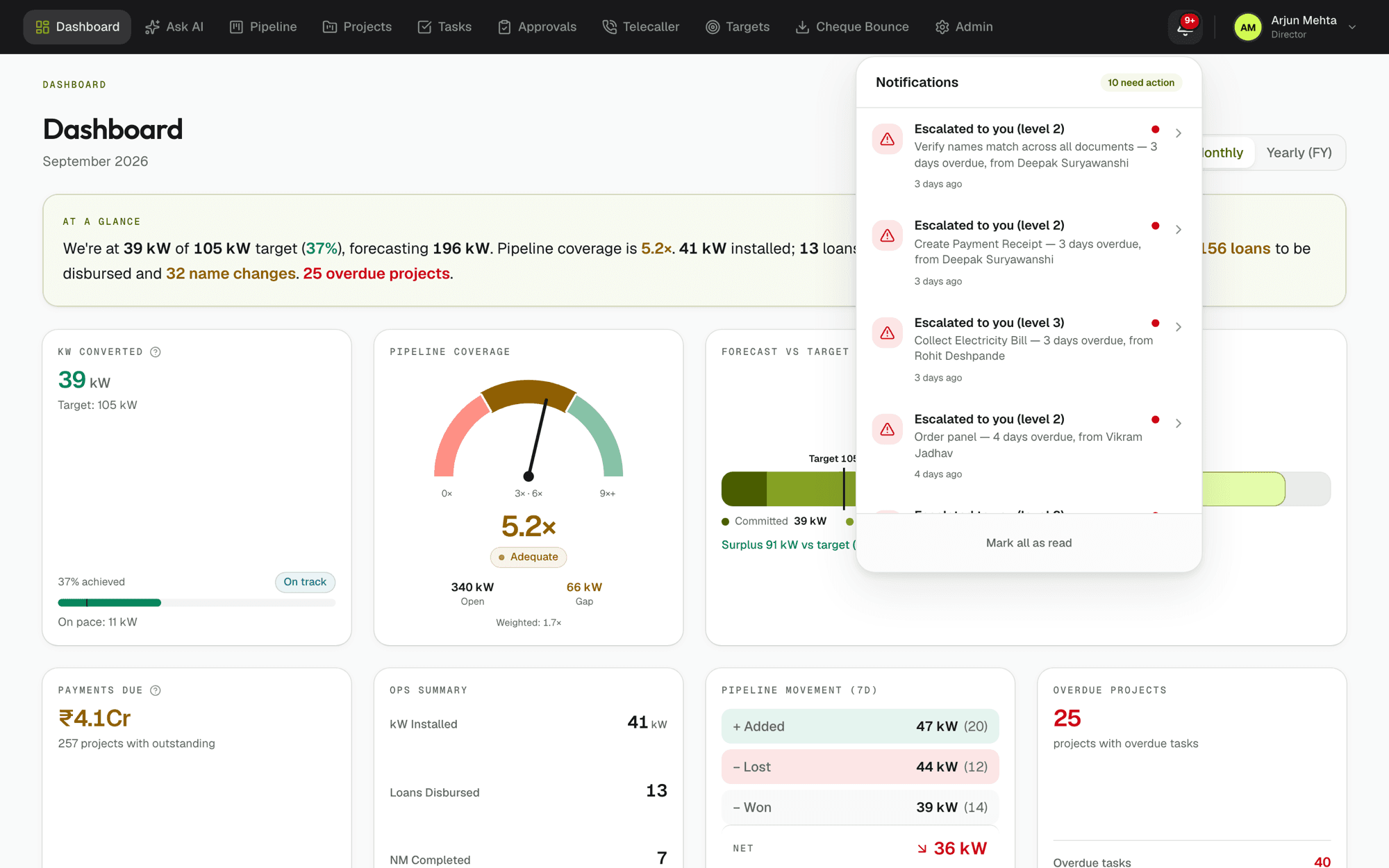
Overdue work climbs one rung up the org chart per night
A task one day overdue moves from its assignee to their manager. Two days overdue, it climbs to that manager's manager. Three days, to the general manager. And on, rung by rung, until it reaches the director. The person it started with still sees it on their own list — escalation is not a transfer, it is a broadcast upward. The path follows the actual org chart: if a rung has no manager on record, the climb stops there and the task counts as being at the top of the chart.
The notification bell shows escalated work live
Everyone with tasks assigned to them, or tasks escalated to them, opens their bell icon and sees them listed. Fresh escalations arrive without an email, and without any cron send or delivery that can fail — the bell reads escalation status live from the database whenever it opens. Due-today reminders still arrive by email at 09:00 IST every morning. Overdue money alerts go to the person responsible for the collection and to their manager at 07:00 IST.
Everything else you would ask
Does escalation mean the task is removed from my list?
No. Escalation adds more eyes to late work, it does not move it. The person it started with still sees it on their own list. Their manager and their manager's manager see it too. It is a broadcast upward, not a transfer. Closing the task removes it from everyone's list at once.
What happens when a task reaches the director?
It stays on the director's list, and it keeps climbing in the sense that the system continues to mark it overdue. If a director's own assigned task reaches day five overdue, it reaches the top of the chart and the director is the one seeing it. There is no rung above the director — the escalation stops but the overdue count keeps rising.
Can a task escalate backwards if someone catches up?
No. Escalation is added, never taken away. Once a task is overdue and has climbed to a manager, it stays on that manager's list even if the original assignee closes something else that same day. The only way to stop the climb is to close the overdue task itself. Closing it removes it from everyone's list.
If I am on leave, does a task still escalate?
Yes. Escalation runs every night whether anyone is in the office or not, and it counts calendar days. Your manager will see it the next morning when they open the bell. If you are truly out and the task is not on your list of things to hand over, that is a process question — escalation will surface it, but the handover is up to your team.
Does this mean more emails and notifications?
Not necessarily. Escalation reaches the bell, which is live and pulls no notifications. Due-today reminders are one email at 09:00 IST regardless of how many people the task has escalated to. Overdue money goes to two people (owner and manager) only, at 07:00 IST. No email for every rung climbed. The bell stays silent unless you open it.
How does the system know the org hierarchy?
When you set up, you define who manages whom. Each person has a manager assigned. Escalation follows that org chart exactly. If a rung has no manager on record, the climb stops there and that person is the top of the chart for that task. If the org chart changes, escalation paths change immediately with it — no backlog of stale climbs.
Run one real project through it this month. You will know by the end of it.
30 days free, no card, no call. Then ₹10,000 a month for the whole company, however many people you put on it.